
Some projects are best understood visually. Whether it is a concept plan, strategic framework, infrastructure proposal or long-term policy document, people often engage more confidently when they can see information presented clearly and interact with it in context.
That is where the Interactive Media Tool becomes valuable. As part of Engagement Hub’s suite of 38 engagement tools, it allows organisations to upload a background image and place clickable points across that image, each opening rich content pop-ups containing text, images, video or supporting information.
The result is a highly visual engagement experience that can be used to both inform stakeholders and collect feedback within the same project.
What the Interactive Media Tool Does
The Interactive Media Tool enables organisations to build an visual engagement experience around a single visual asset such as:
- A masterplan
- Concept design
- Strategic framework
- Diagram
- Aerial image
- Timeline
- Process illustration
Each point placed on the image can contain:
- Additional written information
- Supporting images
- Embedded video
- Links or documents
If feedback is required, organisations can also enable participation features on each item individually, including open and closed comments, voting up and/or voting down.
This means some items can simply provide information, while others actively invite response.
Example 1: City of Parramatta – Epping Aquatic Centre
A strong example of the Interactive Media Tool in use is City of Parramatta’s Epping Aquatic Centre project.
Using a project image as the background, Council created clickable points across the design so stakeholders could explore different aspects of the proposal in detail.
This allowed the community to:
- View specific project elements visually
- Open pop-up windows with additional explanation
- Understand individual components of the proposed aquatic centre
The strength of this approach is that it presents complex design information in a much more accessible way than static documents alone.
For projects like aquatic centres, precinct upgrades or public facilities, the Interactive Media tool helps turn large design plans into something much easier for communities to navigate.
Example 2: Department of Premier and Cabinet Tasmania – Drought Ready Tasmania
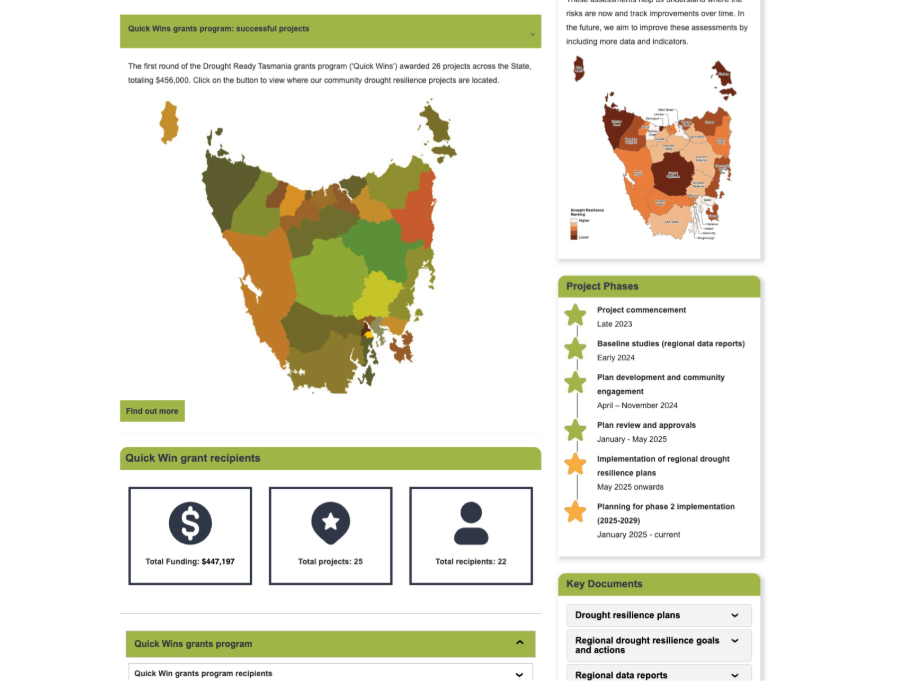
The Department of Premier and Cabinet Tasmania used the Interactive Media Tool within the Drought Ready Tasmania project to communicate detailed regional drought resilience planning in a highly visual way.
The project supports three regional drought resilience plans across Tasmania and includes large volumes of information covering:
- Regional priorities
- Action areas
- Funding opportunities
- Community resilience initiatives
- Climate adaptation goals
The project combines maps, timelines, case studies, videos and linked content to explain drought resilience planning and implementation across the state.
The interactive media tool was used to specifically display where the grants program was allocated across the state.
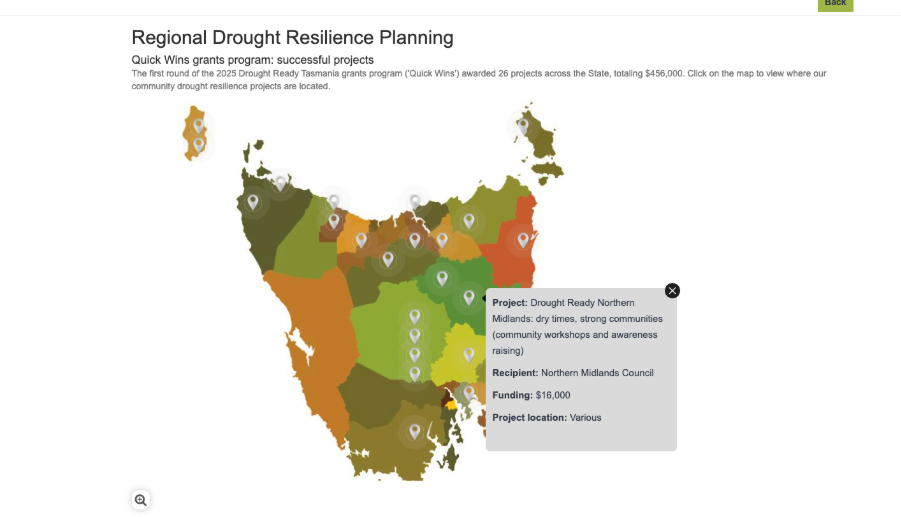
This demonstrates how the Interactive Media Tool can support not only consultation, but also long-term public communication around policy and implementation.
Example 3: Ku-ring-gai Council and EV Charging Stations
Ku-ring-gai Council took a different approach when consulting on six proposed EV charging station locations across council car parks. Rather than enabling open commenting, they used the tool purely as a quantitative feedback mechanism.
Their configuration included:
- Six pinned locations, each representing a proposed EV charging site
- Photos and bullet point information within each pop-up
- Links to additional supporting plans
- Vote up and vote down enabled as the primary engagement metric
- Commenting switched off entirely
This gave Ku-ring-gai Council a clear, comparable data set across all six locations — straightforward for participants to complete and simple for the team to analyse.
Common Uses for the Interactive Media Tool
The Interactive Media Tool is particularly effective for:
- Masterplans and concept plans – upload a site layout or aerial image and add detailed project information
- Strategies and frameworks – explain priorities visually within one image
- Infrastructure projects – help communities understand staged upgrades
- Visioning documents – break complex ideas into accessible visual sections
- Informative project pages – where feedback is not required but clarity is essential
Informative or Participatory — Or Both
A key advantage of Interactive Media is that organisations can decide exactly how interactive each item should be.
For purely informative use like the Drought Ready example above turn off comments and voting. For feedback-driven use, enable comments and allow voting on selected items
This flexibility means one project can contain both explanation and participation without needing separate tools.
Learn More About the Wider Engagement Hub Toolkit
The Interactive Media Tool is often used alongside other Engagement Hub tools such as:
Together, these tools help organisations explain complex projects clearly while collecting meaningful feedback in one place.
To explore how different tools can work together, learn more about Engagement Hub’s wider suite of engagement tools.